
In today’s global market, your brand is the first impression customers have of you – across websites, social media, ads, and more. A professional branding agency helps craft a clear, consistent identity and messaging that instantly signals who you are and what you stand for. By aligning your visual design, tone and values, a branding agency earns your customers’ confidence. When done right, this trust translates into long-term growth: customers pay premium prices and stick with brands they believe in. In other words, brand trust fuels loyalty and boosts revenue.
What Is a Branding Agency? (Brand Building & Strategy)
Think of a branding agency as your brand’s personal coach and creative strategist. Brand building starts here: the agency defines your unique value proposition and designs how your brand looks and sounds across channels. This includes your logo, website, color palette, and even your content voice. By developing a strong branding strategy and consistent identity, they make you recognizable in any market. For example, McKinsey reports that companies with purpose-led, consistent brands grow twice as fast as their peers, and Lucidpress finds consistent branding can boost revenue by ~23%. In practice, a branding agency ensures every touchpoint from email templates to store signage – reinforces one clear message: you’re a trustworthy, professional organization.

A branding agency also serves as your advisor on positioning. They research your audience and competitors, then craft messaging that speaks to customers’ needs and values. This storytelling is what makes your brand relatable. (Ever notice how memorable brands – like Apple or Nike, tell a story you can buy into? That’s no accident.) In short, a branding agency turns abstract brand concepts into a living, breathing identity that people can trust.
Why Trust Matters: The Hidden Currency of Brands
Trust isn’t just a buzzword, it’s literally the currency of modern marketing. Research shows that about 67% of consumers won’t keep buying from a brand unless they trust it. Trust is defined as a consumer’s belief in your brand’s ability and intent to deliver responsibly. It comes before loyalty; customers buy from brands they trust, and then become repeat buyers and advocates for them. Global studies by Edelman and Yale confirm this: trusted brands see far more purchase, loyalty and advocacy than others.
Because of this, branding isn’t a “nice-to-have” – it’s a business imperative. Strong brands “outperform” weaker ones not just in recognition, but in measurable outcomes like revenue growth and pricing power. For instance, agencies have found that investing in brand-building lets you charge premium prices and lower acquisition costs, because customers feel safe choosing you. In contrast, inconsistency breeds doubt: mixed messages or sloppy design make people skip your products and go elsewhere. Trust erodes fast when branding is unclear.
How Brands Earn Trust
- Consistent Messaging: Repeated, familiar messaging across ads, websites, and packaging reassures customers. Clear claims and values (no contradictions) signal reliability.
- Proof of Quality: Deliver what you promise. Agencies help emphasize product/service quality and transparent policies, so customers feel confident. (A Qualtrics study notes customers reward clear policies and reliable service with higher trust.)
- Shared Values: Modern consumers (especially Gen Z) want brands that stand for something. Agencies can articulate your purpose or social mission (if genuine) to connect emotionally. Brands with a strong purpose grow about 2× faster than others.
- Positive Experiences: Every interaction – from browsing your site to using your product should reinforce trust. Branding agencies design those experiences (e.g., UX, packaging, support) to be on-brand and user-friendly.
How Professional Branding Agency Build Trust
A professional branding agency has a toolbox of tactics to cultivate trust on your behalf. Here’s how they do it:
Crafting a Clear Narrative
Professional branding agency help you tell your story. They identify what makes your brand unique and weave that into every piece of content. A coherent narrative why you exist, who you serve, and what problems you solve – signals expertise and honesty. (As Yale management faculty note, consumers form trust over time based on a brand’s actions and values.)
Design Consistency
Designers ensure all your visuals match across channels: logo, colors, fonts, and imagery all reinforce the same brand vibe. This visual consistency makes your brand instantly recognizable and reliable in the customer’s mind. Think of it like meeting someone in different outfits but it’s the same person consistent branding tells customers: “Yes, this is still the same trusted company.”
Customer-Centric Approach
Branding agency conduct research (surveys, interviews, data analysis) to learn what your customers care about. By knowing your audience deeply, they tailor messaging to answer customer questions and concerns before they arise. In today’s data-driven era, this is key: brands that listen and respond to consumers build stronger bonds.
Digital Brand Experience
In a global market, digital presence is everything. Branding agencies optimize your website, social media, and even emerging channels (apps, chatbots, AR) to feel consistent and trustworthy. BrandTrust consultants emphasize that every digital touchpoint must match your core branding. For example, if your offline promise is “premium,” the site should load quickly on high-quality servers, with polished design. Seamless, high-quality online experiences boost credibility.
Transparent Communication
Good agencies help you put clear policies and contact channels in place. FAQs, live chat, and visible contact info show that you’re reachable and accountable. Qualtrics reports that transparency (clear return policies, disclosures) makes customers feel safer and more loyal.
Ultimately, a branding agency becomes a trusted advisor. They don’t just make things “look pretty”, they align every part of your brand with honest promises. When customers see that your messaging, actions, and values match over time, they believe in you.
Digital Branding & 360° Branding for Global Reach
Today’s consumers interact with brands across a “no-line” world of online and offline touchpoints. A global branding agency offers a 360° branding solution, meaning it covers everything from logo design to digital marketing to customer experience. This holistic approach ensures consistency everywhere: in-store, on social media, in search results, and beyond.
Integrated Strategy
360° branding agency tie together your digital campaigns, PR, events, and traditional ads so they reinforce each other. For example, a product launch might include a consistent hashtag, email theme, and packaging design, all communicating one unified message. This 360° view prevents mixed messages and shows customers you’re professional on every front.
Globalization
A good agency adapts your branding for different regions (languages, cultures) while keeping the core promise intact. They ensure you don’t lose identity across borders. (For instance, color meanings differ by culture; a global agency knows to adjust these details.) The result: no matter where in the world someone encounters your brand, they get the same vibe of trust.
Branding Hubs and Services
Many branding agency position themselves as full Branding Hubs, offering a suite of services: brand strategy, graphic design, content creation, and technology. By owning all of these pieces, the agency maintains quality control. This is why terms like “360 Branding Service” or “Branding Hub” exist – it’s an all-in-one branding solution. For clients, this means one partner (like Elevatech Digital) orchestrates the entire brand journey, so nothing falls through the cracks.
Digital Branding Tools
Agencies use analytics and AI tools to track how your brand performs globally. They monitor brand mentions, sentiment, and engagement to tweak strategy in real time. AI-powered audits and dashboards help measure if your brand is being perceived as intended across markets. This data-driven oversight is vital for maintaining trust: if something’s off-brand, the agency catches it quickly.
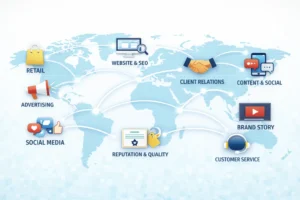
By building a unified presence online and offline, branding agencies turn a fragmented marketplace into a cohesive brand ecosystem. Consumers feel confident because your brand speaks with one clear voice, whether they’re scrolling on a phone in Tokyo or seeing your billboard in London. Consistency across channels is especially critical for SEO and AI-driven search overviews, a unified brand story helps search engines understand and favor your content, improving visibility globally.
From Trust to Long-Term Growth: Real Results
The proof of effective branding is in the growth it drives. When a branding agency succeeds, you see real business outcomes: higher sales, lower churn, and a more valuable brand. Here are some key impacts:
- Higher Revenue & Loyalty: Consistent, trust-building branding has a direct ROI. According to McKinsey, purpose-driven, consistent brands grow revenue 2× faster than competitors. Similarly, a Lucidpress study found consistent branding can increase revenue by up to 23%. And Edelman data shows trusted brands enjoy much higher customer loyalty – when people trust a brand, they’re more likely to buy new products and stick around. In fact, Edelman reports that consumers trust is the trigger: trusted brands see dramatic boosts in repeat purchases and advocacy.
- Effective Marketing Campaigns: An IPA (UK industry body) analysis found that marketing campaigns that significantly increase brand trust deliver 41% more business impact (sales, market share, profit) than average campaigns. In their databank of 812 campaigns, 93% of trust-focused ads drove very large business growth, versus 66% overall. In practice, this means that every dollar spent on brand advertising (vs just short-term sales ads) tends to yield bigger results when trust is the goal.
- Brand Equity & Price Premiums: Brands that are trusted and well-branded can charge more. Elevated brand equity means customers feel the extra value. Agencies help your brand earn that equity: strong brands often maintain healthy margins because consumers willingly pay a premium for perceived quality and reliability.
- Global Recognition and Scale: A branding agency’s holistic approach makes international expansion smoother. With a solid brand foundation, you can enter new markets faster (a known logo and message resonates). Agencies leverage digital channels (SEO, social media) to introduce your brand globally, while preserving trust. Over time this expands your customer base and market share worldwide.
How Branding Agency Services Fuel Growth
| Service / Approach | Impact on Trust & Growth |
|---|---|
| Strategic Positioning | Clarifies what makes you unique and why it matters. A sharp positioning statement helps customers immediately understand your value, building trust from the first encounter. |
| Visual Identity & Design | Creates a memorable, cohesive brand look (logo, colors, packaging). A consistent design language makes your brand instantly recognizable and conveys professionalism. |
| Messaging & Content | Delivers clear, customer-focused messages across channels. Telling a compelling brand story (through copy, video, etc.) connects emotionally, and being transparent in messaging builds honesty. |
| Digital Branding & UX | Ensures every online touchpoint (website, app, social) is user-friendly and on-brand. A seamless digital experience reassures customers (they see you care about detail). |
| 360° Marketing Integration | Coordinates all marketing (ads, Digital PR, events, SEO) so every campaign reinforces your brand. Integrated campaigns increase recall and reinforce trust as customers see the same promise everywhere. |
| Continuous Feedback & Analytics | Uses data to monitor brand health (awareness, sentiment) and adjust strategy. Agencies track KPIs like engagement and brand lift to ensure your brand stays aligned with customer expectations. |
Conclusion: Your Brand as a Growth Engine
Building a trusted brand isn’t an overnight task – it’s a continuous, strategic investment. A professional branding agency guides you through each step: discovering your audience’s needs, defining your brand promise, crafting visuals and stories, and constantly measuring results. The payoff is worth it: studies and case histories show strong branding leads to higher sales, more loyal customers, and a global reputation that outlasts short-term trends.
No matter where your business is based, Elevatech Digital (your brand partner) focuses on what customers worldwide crave: authenticity, consistency, and meaningful engagement. By placing trust at the center of your brand strategy, your agency ensures that every campaign, design, and touchpoint reinforces the message: “You can rely on us.” That trust then pays off in real growth – long-term success, market leadership, and a community of advocates telling others about you.
Are you ready to let your brand lead? A great branding agency doesn’t just design logos; it builds the foundation for lasting customer relationships. Reach out to learn how Elevatech Digital can help your brand earn trust and achieve the global growth you envision.
Frequently Asked Questions
-
What is a branding agency and what do they do?
A branding agency is a firm of experts that helps companies build and manage their brand identity. They research the market, define your brand’s mission and values, create visual elements (logos, color schemes), and develop messaging that resonates with your audience. Essentially, they make sure every part of your brand – from website to packaging – looks and sounds consistent and appealing.
-
How does a branding agency build trust?
Branding agencies build trust by ensuring consistency, clarity, and authenticity in everything your brand does. They help you tell a clear brand story (so customers know what you stand for), maintain a uniform look and voice across all channels, and emphasize honest communication (like clear policies and quality standards). Consistency and transparency make customers feel safe choosing you. They also use customer insights to make sure your brand meets real needs, which demonstrates reliability over time.
-
Why is branding important for long-term business growth?
Branding lays the groundwork for customer loyalty and premium pricing. Strong brands are memorable and evoke positive feelings, so customers choose them over unknown alternatives. A study by McKinsey and others found that purpose-driven, well-managed brands grow revenue twice as fast as others. Additionally, trusted brands see repeat sales and word-of-mouth referrals. In short, effective branding means you spend less on marketing per sale and keep customers longer, which fuels sustainable, long-term growth.
-
What is a 360° branding service or branding hub?
A 360° branding service means the agency handles every aspect of your brand experience – design, messaging, digital content, advertising, and more – to present a unified brand everywhere. It’s like a one-stop shop for all things branding. A branding hub is similar: it’s the central point where your entire branding strategy is coordinated. Using a 360° approach ensures that your brand is cohesive across online and offline channels, which is crucial for maintaining trust in today’s omnichannel world.
-
Why should I hire a professional branding agency instead of doing it myself?
A professional agency brings specialized expertise, fresh perspective, and resources you might not have in-house. They know the latest design trends, have market insights, and use data tools to track your brand’s performance. Most importantly, they focus solely on your brand full-time, ensuring nothing falls through the cracks. When you hire a branding agency like Elevatech Digital, you get a dedicated partner committed to building trust and growth for your brand, backed by proven strategies and global experience.