

Voice Search SEO is the practice of optimizing your website and content so virtual assistants (Google Assistant, Alexa, Siri, etc.) can find and speak your answers. Unlike traditional SEO, voice SEO focuses on natural, conversational language, concise answers, and local intent. When users speak, they expect one clear, useful answer instead of a page full of links. In other words, voice search SEO rewards clarity, brevity and trust. By structuring your content as direct Q&As, how-to steps, or factual snippets, you give assistants a clear signal for spoken responses.
What is Voice Search SEO? And How It Works
Voice Search SEO is a modern SEO approach that focuses on optimizing content for spoken queries made through voice assistants like Google Assistant, Alexa, and Siri. Instead of typing short keywords, users speak full questions, and Voice Search SEO ensures your content provides the most accurate, concise, and conversational answer.
In simple terms, Voice Search SEO helps your content become the single spoken answer that voice assistants deliver.
Key characteristics of Voice Search SEO:
- Conversational language: Matches how people naturally speak
- Question-based queries: Targets “what,” “how,” “where,” and “why” searches
- Concise answers: Delivers clear responses in 40–60 words
- Local intent focus: Optimizes for “near me” and location-based queries
- Structured content: Uses FAQs, lists, and schema markup
Voice Search SEO is also closely connected with AI SEO, Semantic SEO, and Entity-Based SEO, because search engines now focus on understanding intent and context rather than just keywords.
Quick takeaway: If your content clearly answers real-world questions in a natural tone, you are already moving in the right direction for Voice Search SEO.
Why Voice Search SEO is Important in Modern Search
One survey shows voice assistants on 8.4 billion devices by 2024 (more than the world’s population). Voice search is already used by about one in five people globally, especially on mobile and smart speakers. Importantly, ~75% of voice queries have local “near me” intent. That means small businesses and local content can rank highly in voice results. In short: if you can answer common questions clearly and quickly – especially with local info, voice search SEO can work in your favor.
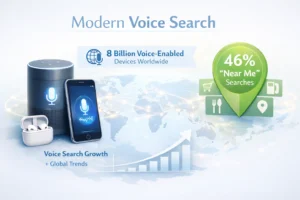
Below, we’ll explain how voice search SEO works, why it matters for SEO today, and exactly how to optimize content for Google Assistant, Alexa, and Siri (with an SEO-friendly, AI-ready approach). We’ll cover natural language tactics, schema markup, site performance, and assistant-specific tips – all with a global perspective (voice assistants handle dozens of languages and regions, after all). Let’s dive in.
How Voice Search Works (Text vs. Spoken Queries)
Voice search SEO lets people speak queries out loud instead of typing. The device converts speech to text, interprets intent, and then delivers a single spoken answer. This process is very fast, within seconds, the assistant might reply, “Mount Everest is 29,032 feet tall” – all without showing you a list of links on the screen.
Because of this “quick answer” format, the way people phrase voice queries is different from typed search. Spoken queries are usually longer and more natural. For example, you might type “weather Pennsylvania” but say, “Hey Google, what’s the weather in Pennsylvania today?”. Voice search SEO often include extras like time, location, or urgency: e.g. “Alexa, where can I buy fresh flowers near me that’s still open now?”.
Because it’s hands-free, voice search SEO is used on the go (cooking, driving, etc.). Unlike typing, the user expects a direct spoken reply – not a list of ten webpages. In practice, that means search engines choose one “position zero” answer (often from a featured snippet or local listing) and read it aloud.
Each assistant has its own sources and quirks: Google Assistant relies on Google Search and the Knowledge Graph; Siri draws from Apple Maps, Yelp, TripAdvisor and WolframAlpha; Alexa pulls mostly from Bing, Yelp, Wikipedia and Amazon’s databases. (In fact, Bing is the default search engine for Alexa.) In all cases, the answer is short, factual, and easy to speak.
Types of Content That Work Best in Voice Search SEO
short definitions or facts, step-by-step instructions, concise Q&A, and accurate local info. For example, a featured snippet or dictionary-style answer (“SEO stands for Search Engine Optimization…”) is perfect to be read aloud. So are structured lists and “how-to” guides (e.g. cooking recipes or DIY steps), because voice assistants can speak them one line at a time. Conversational, relatable blog content (written in a friendly tone, as if chatting) can also win voice traffic, since it sounds like how people actually talk.
Voice Search SEO: Key Differences from Traditional SEO
| Factor | Traditional SEO | Voice Search SEO |
|---|---|---|
| Query Style | Short keywords | Conversational questions |
| Results | Multiple links | One direct answer |
| Content Format | Long-form content | Concise, structured answers |
| User Intent | Broad | Immediate, specific |
| Device Usage | Desktop/mobile | Mobile, smart speakers |
| Optimization Focus | Keywords | Intent + context |
Why Voice Search Matters for SEO (Global Trends)
Voice search SEO isn’t a passing fad – it’s transforming how people discover information. Studies show billions of devices (smartphones, speakers, TVs, cars) now have voice assistants. Roughly 22% of internet users worldwide use voice commands, and usage is growing every year. In many regions, Google Assistant or Alexa are built into phones and speakers that consumers use daily.
Key reasons voice SEO matters:
- Instant answers. When people ask a question out loud, they usually want a single, immediate answer – not a list of results. If your content can be that clear answer, it gets the slot.
- Zero-click engagement. Voice search SEO often leads to “zero-click” scenarios: the assistant gives an answer and users don’t click further. Winning a featured snippet or knowledge card can make your content the spoken answer.
- Local intent. Around 75% of voice queries are local (“near me” searches). People use voice when driving or wandering – “Find a pizza place nearby” – so local businesses optimized with up-to-date maps and hours can dominate these results.
- Growth of AI-driven search. Modern search is blending voice with AI. Google’s AI Overviews and “Search Labs” features parse and summarize content in conversational language. ChatGPT and Siri’s upcoming models increasingly handle voice queries with generative answers. This means content must be structured for AI as well as for voice.
Global impact: Voice technology spans continents and languages. Google’s voice search supports 119 languages, and many people use assistants in French, Spanish, Hindi, etc. (Siri covers 21 languages, Alexa 8). As voice adoption grows in APAC, Europe, the Middle East and beyond, SEO must adapt to each market’s devices and language nuances. For global reach, focus on clear, factual answers and entity-rich content that transcends cultural boundaries.
In summary: voice search SEO is shaping consumer behavior worldwide. It favors brands that can answer questions on the first try with trustworthy, local information. By optimizing for voice, you meet people exactly when and how they ask.
Key Voice Search SEO Strategies
To optimize for voice search SEO (and its AI/answer-engine partners), follow these key tactics. (Note: many of these overlap with good modern SEO, but applied in a conversational context.)
- Use natural, question-based headings. Voice queries are phrased as questions. Instead of “Vacuum Cleaner Features”, use a heading like “What are the most important features in a vacuum cleaner?”. Framing H2/H3 as the exact questions people ask helps voice assistants pull the right answer.
- Target long-tail, conversational keywords. People speak in complete sentences: think “how do I…” or “where can I…” instead of keyword fragments. Incorporate phrases like “best [product] for [use]” or “how to do [task]” as natural sentence keywords. These are usually less competitive and match voice intent.
- Answer FAQs with concise Q&As. Dedicate a section of each page (or separate FAQ page) to common questions, each followed by a brief answer. Use FAQPage schema markup so Google sees them as questions and answers. For example:
- What is a panic attack? A panic attack is a sudden episode of intense fear with symptoms like a racing heart.
- Can you stop one once it starts? Yes – techniques like deep breathing or grounding exercises can help lessen it.
Voice assistants will speak these answers directly, so keep the Q&A sections simple and factual.
- Prioritize mobile speed and usability. Since most voice queries come from phones and smart speakers on the go, site performance is critical. Aim for a Largest Contentful Paint (LCP) under 2.5 seconds. Compress images, use caching, and streamline your page so it loads instantly over mobile networks. Also ensure your design is mobile-friendly (responsive layout, large buttons, readable fonts) – after all, when a voice assistant answers, curious users might tap through to your site.
- Optimize for featured snippets and ‘zero-click’ answers. To win the spoken answer, get your content into Google’s featured snippet (position zero). This means: provide a direct answer (40–60 words) immediately below a relevant question-style heading. Use bullet points or numbered lists for how-tos. And always put the key answer sentence right under the question, without fluff – voice assistants will read that first sentence.
- Implement rich schema markup. Structured data tells search engines exactly what your content is. Use FAQPage schema, HowTo schema, Article markup, and LocalBusiness schema as relevant. For voice search SEO, schema is especially powerful: it increases the chance your content is used as a spoken answer or snippet. Also consider Speakable schema (for eligible news content) to mark sections ideal for TTS audio. Proper schema lets Google’s AI Overviews and even ChatGPT voice assistants recognize your content as authoritative answers.
- Keep sentences short and clear. Voice assistants sound best when reading short, simple sentences. Aim for an 8th-grade reading level. Break complex thoughts into multiple sentences or bullet points. When writing answers, imagine you’re explaining something to a friend – use “you” and contractions, avoid jargon. Snappy writing helps both human readers and AI parse your message quickly.
- Update local business listings. For any local or commercial content, make sure your name, address, and phone number (NAP) are exactly the same across Google Business Profile, Apple Maps Connect, Bing/Yelp, and your site. Voice assistants rely heavily on these listings. For example, when a user asks Alexa or Siri to find a nearby store, it pulls info from Yelp, Apple Maps or Bing. Keep your hours, descriptions, and photos up-to-date. Encourage reviews on Yelp and TripAdvisor too – Siri and Alexa often trust high ratings in their recommendations.
These strategies collectively boost Entity SEO: they emphasize clear answers about entities (people, places, products) rather than keyword stuffing. By aligning your pages with voice users’ intent (the questions they actually say), you improve visibility in AI-driven results.
Optimizing for Google Assistant (Android, Home)
Google Assistant pulls from the Google Search index and Knowledge Graph. To optimize:
- Follow Google’s traditional SEO best practices, since voice search SEO is an extension, not a separate science. High-quality, authoritative content is still key.
- Answer questions with Featured Snippets. As above, aim to capture snippets by formatting concise definitions and lists. Assistants often read these verbatim.
- Use Google Business Profile (GBP) fully. For local voice queries (“near me”), a complete GBP (accurate address, hours, images, keywords in your description) is essential. Google Assistant will read from your GBP if it matches the query.
- Leverage schema and FAQs. Mark up your page with FAQ and HowTo schema. Google explicitly recommends structured Q&A content for voice optimization. Also, use “speakable” schema if you publish news/long-form content, to highlight audio-friendly sections.
- Test with actual voice devices. Try asking Google Assistant your target questions on an Android phone or Home device. If it doesn’t find your answer, adjust your content wording or structure accordingly. Monitor Google Search Console for question-type queries (How/Why/What) to see which content Google shows.
In summary: For Google Assistant, focus on being the one clear answer Google would give. Think “position zero for voice”.
Optimizing for Amazon Alexa
Alexa’s approach is different. Alexa does not crawl the web like Google; instead, it sources answers from Bing, Yelp, Yext, Wikipedia, AccuWeather and Amazon’s own databases. Here’s what to do for Alexa:
- Ensure strong Yelp and Bing presence. Alexa pulls local business info from Yelp and Bing Places. Make sure your business is accurately listed there. For example, a well-optimized Yelp profile (with photos, up-to-date hours, and good reviews) can get spoken by Alexa.
- Don’t neglect Bing Webmaster Tools. Since Bing powers Alexa’s search, use Bing’s SEO tools and submit your sitemap to Bing. Mirror your high-quality content on your Bing indexable site.
- Consider an Alexa Skill (if relevant). For large brands or apps, building a custom Alexa Skill (a voice app) can secure a spot in Alexa’s responses. For instance, create an Alexa Skill that answers FAQs about your service or provides daily tips related to your industry. This isn’t needed for every site, but it’s an option to rank higher in voice.
- Same site fundamentals apply. Alexa’s AI may still use some text pages (via Bing), so keep your content fast, structured, and answers-focused. The general “conversational FAQ” and schema tactics (above) still help Alexa surface information from the web.
To put it simply: Visibility for Alexa is often won outside Google. Keep your brand data (name, address, services) pristine on Yelp, Bing, Yext, Wikipedia, etc., and focus on answering user questions clearly.
Optimizing for Apple Siri
Siri’s voice results emphasize local and direct answers. Siri mixes data from Apple Maps, Yelp, TripAdvisor, WolframAlpha (and Google Search for general queries). Key tips for Siri SEO:
- Claim Apple Maps Connect. Just like GBP for Google, make sure your Apple Maps business listing is claimed and 100% filled in. Siri relies heavily on this for location queries.
- Boost Yelp & TripAdvisor reviews. A high Yelp or TripAdvisor rating can make Siri read your business as “the best-rated option” in an area. Encourage satisfied customers to leave reviews.
- Use clear, on-site Q&A for facts. For non-local questions, Siri will try to use Google or WolframAlpha for answers. Well-structured FAQs and short answers on your site (especially if syndicated in Google’s search index) can sometimes be picked up.
- Focus on structured data too. Apple’s ecosystem doesn’t officially use schema for Siri voice in the same way Google does, but having clean structured pages (with local business metadata, for example) is still important.
- Optimize for ‘Hey Siri’ phrasing. People often say “Hey Siri, find a [service] near me”. Make sure your pages have a clear location context (city, neighborhood names) in headings or intro, so Siri can match voice queries to your content.
Overall, Siri optimization is essentially local SEO with voice in mind. Keep your business info tight, answer common customer questions on your site (so Siri can read them if needed), and gather strong local reviews.
AI & Generative SEO: Answer Engines and AI Overviews
Voice search SEO is part of a bigger AI-driven shift in search. Modern assistants use AI to break queries into sub-questions and generate spoken summaries. Google’s Search Generative Experience (AI Overviews) and voice chat features even cite multiple sources. To play this game, your content should be entity-rich and semantically clear.

In practice:
- Write “self-contained” answers. Each paragraph should start with a summary sentence that stands on its own. If Google’s AI overview or ChatGPT voice chat needs a snippet, it can pull from that line. For example, begin a section with “According to a 2024 study, 8.4 billion voice assistant devices will be in use by 2024,” so an AI excerpt can read it aloud with your attribution.
- Use clear definitions and lists. AI overviews love definitions (“X is…”) and ordered lists. These formats mirror how voice assistants speak.
- Be explicit with entities. Mention people, brands, products by full name when relevant. For example: “Voice Search SEO (the process of optimizing for spoken queries) is increasingly tied to AI and Semantic SEO” – then go on to explain what Semantic or AI SEO means.
- Include answer-focused sections. Keep doing what benefits voice: FAQ blocks, bullet answers, and schema. These also make it easier for generative AI to scan and quote your content.
By optimizing this way, your content becomes AI- and voice-friendly simultaneously. You capture the zero-click voice answer and stand a chance to be featured in AI Overviews or ChatGPT voice responses.
Voice Search SEO Checklist
To recap, here’s a quick step-by-step checklist for voice search SEO:
- Fast, Mobile Site: Ensure <2.5s load on mobile. Compress images and remove heavy scripts.
- Claim Local Listings: Verify your Google Business Profile, Apple Maps listing, Bing/Yelp entries with complete info and photos.
- Answer FAQs: Identify your top 10–20 customer questions (via tools like People Also Ask or AnswerThePublic) and answer them in clear FAQ blocks. Use H2/H3 as the questions.
- Write Conversationally: Use “you” language, contractions, and short sentences. Read it aloud; if it sounds robotic, simplify it.
- Format for Snippets: Put the direct answer immediately under the question heading (no filler). Bullet lists or numbered steps for instructions.
- Add Schema Markup: Include FAQPage, HowTo, and LocalBusiness schema. If applicable, add Speakable schema to highlight audio-friendly parts.
- Optimize Keywords: Use long-tail, question-based keywords naturally in your content and headings. Maintain about 1.5% density of “Voice Search SEO” (e.g. 20–30 mentions in a 2000-word article).
- Gather Reviews: Encourage reviews on Google, Yelp, TripAdvisor, etc. Voice assistants often factor star ratings into spoken recommendations.
- Monitor Performance: Track question-like queries in Google Search Console (look for impressions on “how/what/where” keywords). Set alerts for featured snippet rankings – these are your voice gold.
Implementing these steps will make your site much more voice search SEO friendly across all major assistants.
Conclusion
Voice Search SEO is about adapting to the way people speak to search. It’s not a gimmick, it’s an integral part of modern, AI-driven SEO. By structuring your content to give crisp, conversational answers and by fine-tuning your technical SEO (speed, schema, mobile) for AI assistants, you can capture the exact moment customers ask their questions aloud.
Start with your most common customer questions. Answer them clearly on your site with FAQ markup. Clean up your local listings (Google Business Profile, Yelp, Apple Maps). Write as if you’re talking to a friend, not writing an essay. These steps will help your brand be heard, literally, on Google Assistant, Alexa and Siri across the globe.
Is your business ready to be the answer people get when they say “Hey Google” or “Alexa”? Optimize now and future-proof your visibility. Contact Elevatech Digital today and transform your SEO strategy for the future of AI search.
Frequently Asked Questions
-
How is Voice Search SEO different from traditional SEO?
Voice Search SEO shifts focus to conversational phrasing, quick answers, and local intent. Instead of targeting single keywords, you target full question phrases and provide concise answers. Voice SEO also heavily uses structured data and FAQ formats, whereas traditional SEO often centers on longer content and link-building. Ultimately, it’s about being “featured snippet-ready” for spoken results.
-
Do I need special content for voice search?
Yes and no. You don’t need entirely separate pages, but you should ensure your existing content can be understood in a conversational way. This means adding FAQ-style Q&As, summarizing key points in the first 1-2 sentences of sections, and using bullet lists for steps. Think about the questions users will ask and make sure your content answers them clearly at the top of each section.
-
Will optimizing for voice help my rankings for text search too?
Absolutely. Voice-optimized tactics (fast site, quality content, clear answers) are also overall SEO best practices. Many things overlap. Winning a featured snippet or improving page speed boosts both voice and regular search traffic. The main difference is emphasis: voice optimization tweaks content to be more question-focused and scannable.
-
How do I optimize specifically for Google Assistant vs. Alexa vs. Siri?
Each assistant has its own ecosystem:
- Google Assistant: Focus on Google Search best practices – claim and fully optimize your Google Business Profile, target featured snippets, and use schema.
- Alexa: Emphasize Bing, Yelp, and Amazon presence. Ensure your Yelp and Bing Places listings are accurate, and consider building an Alexa Skill if relevant.
- Siri: Prioritize Apple Maps and local directories. Claim your Apple Maps listing, keep it updated, and gather Yelp/TripAdvisor reviews. In all cases, voice-friendly content and site speed matter across the board.
-
Can voice search SEO help a small/local business?
Definitely. Voice search is heavily local. Many people say “near me” or “open now.” Siri and Alexa often prefer nearby options. By ensuring your location and hours are correct, and answering local questions (“When does X close on Sundays?”), small businesses can outrank big brands for local voice queries. Voice search often levels the playing field for small businesses with good local signals.